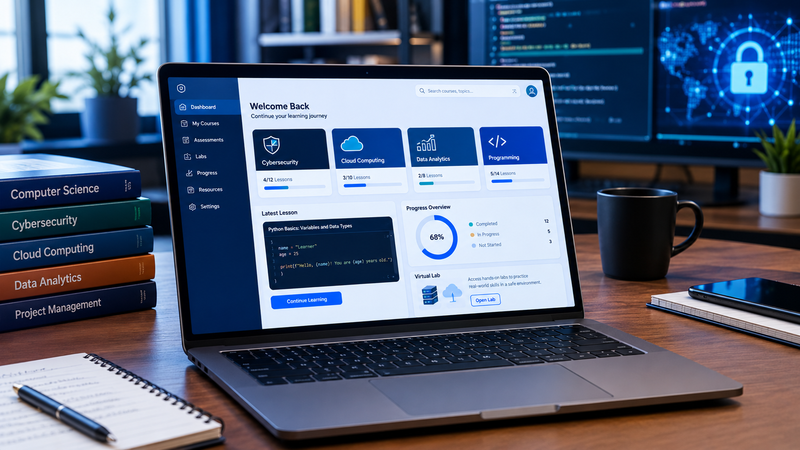
If you’ve ever searched for a way to study IT, cybersecurity, or project management online, you’ve probably come across uCertify. Maybe your college assigned it. Maybe a certification forum mentioned it. Either way, the same questions come up: what is it, what do you actually get, and is it worth paying for?
This guide answers those questions in plain language. You’ll see what uCertify offers, how a typical course works, who it suits, and the things worth checking before you spend any money.
What Is uCertify?
uCertify is an online learning platform built mainly around technology education. It sells and delivers digital courses, practice tests, hands-on labs, and other training material, with a heavy focus on IT and professional certifications.
The idea is to go beyond a plain textbook. Depending on the course, you might get video lessons, quizzes, flashcards, interactive exercises, and virtual lab work, all inside one browser-based space.
The platform is also used by schools and colleges. So there are two common ways people end up on it: an instructor assigns a course, or an independent learner buys one to prepare for an exam or pick up a skill.
The product range is usually described in three parts:
- uCertify Learn, the structured course content
- Hands-on labs, where you practise technical tasks
- TestPrep, the practice questions and exam-style assessments
Lessons explain the theory, labs let you try it, and tests show you what stuck.
How Does uCertify Work?
You start by choosing a course, or by opening the one your school assigned. What you can use depends on that course and on the type of access you have, so it pays to read the course outline first. It tells you what’s covered, how advanced it is, and which resources are included.
Inside the course, the flow is simple. You read or watch a lesson, answer the quiz questions, and move on. Some courses add virtual labs. Many activities are graded automatically, so you get feedback straight away instead of waiting for a teacher.
A habit that works well: finish a topic, do its exercises, then go back over every question you got wrong. Skipping that last step is the most common way people waste a good course. The platform gives you the tools, but your results still depend on how regularly you study.
Main Features of uCertify
Not every course includes every feature, so always check the individual course page. Here’s what you can expect to find in many of them.
Interactive Lessons
Lessons mix written explanations with small activities like flashcards, matching exercises, and quizzes. Because you’re answering questions as you go, you notice gaps early instead of discovering them at the end of a chapter.
Online Assessments
Assessments check how well you understand the material, and many are graded automatically. Practice questions also get you used to the style of questions you may face in an exam. Just keep in mind that doing well on practice tests doesn’t guarantee a pass on the real thing.
Hands-On Labs
In areas like networking, programming, cybersecurity and cloud computing, doing matters more than reading. uCertify offers virtual labs for selected subjects, so you can practise without building your own setup at home. The tools and exercises vary by lab.
Progress Tracking
Completed activities and scores help you see where you’re strong and where you need more work. That’s especially handy if you’re following a study plan for a technical exam.
Courses and Subjects You Can Study
The catalog changes over time, but these are the main areas.
- Information technology: Computer systems, technical support and networking basics. A good starting point before moving to a specialty.
- Cybersecurity: Security concepts, risk management and defensive practices. Exact topics depend on the course.
- Cloud computing: Cloud services, infrastructure and deployment ideas, sometimes with practical exercises on supported platforms.
- Computer science and programming: Programming concepts and software development, with coding exercises or labs in some courses.
- Data analytics: The concepts and tools used to work with data.
- Project management: Learning material linked to project management and its certifications.
Want to explore related topics? Read our technology education and learning resources article on Benzinga Insight for more information about technology-related subjects. Replace this placeholder with the URL of a relevant article already published on your website.
Before you enrol, compare the course description with what you already know. A beginner course suits someone starting from zero, while an advanced one often assumes you’ve done this before.
Can uCertify Help You Prepare for Certification Exams?
Yes, exam preparation is one of its main uses. The TestPrep tools and certification-related courses let you review key concepts, practise questions, and get used to exam formats. Some use interactive question types and give feedback on each answer.
Here’s a sensible way to use it:
- Download the official exam objectives from the certification provider.
- Compare them with the topics in your uCertify course.
- Use practice tests, then study the explanations for every mistake. Don’t just memorise answers.
One important point: a prep course is not a certification. You don’t earn the credential by finishing it. You still need to meet the provider’s requirements and pass their exam. For exam dates, fees, eligibility and current objectives, check the official website of the organisation that issues the certification.
uCertify for Students
Students use uCertify for college coursework, self-study and professional training. Sometimes the school provides access to a specific course; other times a student buys one independently.
It’s useful because it breaks a subject into small pieces: read a lesson, do the exercises, check your understanding, move on. That works well for subjects that need both theory and practice, like programming, where you learn a concept and then apply it in a lab.
Before you start, confirm three things: how you get access, which course you actually need, and when your license expires. If a course is part of a college programme, also check that it includes the labs and assessments your instructor expects.
uCertify for Teachers and Institutions
Educators can use uCertify’s course content and assessment tools to deliver lessons and follow student progress. Some solutions connect with learning management systems, which helps schools fit the material into the setup they already use. Automatic grading and ready-made assessments can also cut down on routine marking and preparation.
Still, a school should test the platform against its own needs before committing. The points to weigh are course coverage, accessibility, technical support, integration options, licensing, and how much staff training is needed. A free trial or demo is the easiest way to judge whether it fits. And no platform replaces a teacher: someone still has to choose the right activities and explain the hard parts.
Does uCertify Offer Hands-On Practice?
For selected subjects, yes. Its labs give you a virtual environment to practise technical tasks.
This matters in IT. Reading about a network configuration is very different from setting one up and seeing what breaks when you get a step wrong. Labs let you make those mistakes safely.
The experience depends on the lab. Some focus on coding, others on cloud computing or technical simulations. Check the lab details before buying, because some courses lean on written lessons and tests while others have much more practical work.
Be realistic, too. A simulation can’t reproduce everything you’ll meet on a real job, and some roles want experience with live systems. But as a first step before bigger projects, labs are a solid way to build confidence.
Is uCertify Easy to Use?
It runs in a web browser, and mobile access is available for supported services. How easy it feels depends on the course and on how much online learning you’ve done before. If you’ve used a learning management system, you’ll probably find your way around quickly. If you haven’t, give yourself a little time.
On day one, look through the course dashboard and find where the lessons, quizzes, labs, and progress pages are. Also check that your device and internet connection can handle the labs, since they can need more than a simple video lesson. If your school assigned the course, follow their login instructions and ask for help early if access fails.
How Much Does uCertify Cost?
There’s no single price. Cost depends on the course, the product, the license, and how you get access. Some students get it through their institution, while independent learners buy a specific course or package, and each one can bundle lessons, labs, assessments and support differently.
Before paying, check the current price on the official uCertify website and look closely at what’s included. Pay attention to:
- How long your license lasts
- Renewal terms
- The refund policy
- Any limits on access
It’s also worth comparing alternatives, such as official certification materials, books, other online platforms and free resources. Price isn’t the only factor. If you need practical lab time, a course with good labs can be worth more than a cheaper text-only option. If you just want a quick refresher, a book might be enough.
Benefits of Using uCertify
- Everything in one place: Lessons, quizzes, assessments and labs can sit in the same environment.
- Wide subject range: You can sample different tech areas before choosing one to go deeper in.
- Active learning: You answer questions and practise tasks instead of just reading, and the feedback shows your weak spots.
- No hardware needed: Virtual labs help when you don’t have the equipment or software at home.
- Support for teachers: Digital materials and assessment tools help with delivering structured lessons.
These benefits depend on the course you pick and how you use it, so check the included features rather than assuming every product has them all.
Limitations to Consider Before Enrolling
It isn’t right for everyone. Think about these before you buy:
- Features vary: If you need lots of practical training, confirm the course really includes suitable labs.
- Pricing and licenses differ: Know how long you’ll have access and whether you must renew.
- It takes self-discipline: If you struggle to study without deadlines, an instructor-led class may suit you better.
- No guarantees: A prep course doesn’t promise a certification, a job, a promotion or a raise. Results depend on your knowledge, experience and effort, and on what employers and certification bodies require.
- Match it to your goal: Compare the curriculum with the official exam objectives or the skills your target role needs.
Spending a little time on these checks can save you from paying for features you’ll never use.
How to Get Started With uCertify
- Decide what you want: Exam prep and learning to code from scratch call for different courses.
- Browse the official website: Visit uCertify.com and read the course description and learning objectives.
- Check what’s included: Confirm whether you get video lessons, quizzes, TestPrep, virtual labs or instructor support. Don’t assume every package has everything.
- Review price and access terms: If your school or employer provides access, follow their enrolment steps first.
- Build a realistic schedule: Set aside time for lessons, labs and reviewing wrong answers, and break big topics into small goals.
- Add other resources if needed: For exams, keep the official objectives next to your course and fill any gaps.
Frequently Asked Questions About uCertify
What is uCertify used for?
It’s used for online learning, technical training, certification preparation and course delivery. Its offerings include interactive lessons, assessments and hands-on labs for selected subjects.
Is uCertify good for beginners?
It can be, depending on the course. Check the listed prerequisites and skill level first, because a course aimed at experienced professionals may assume prior knowledge.
Does uCertify provide certification exams?
uCertify provides courses and test prep related to professional certifications, but finishing a course isn’t the same as earning the certification. Check the certification provider for exam requirements.
Can I get practical training on uCertify?
Yes, for selected courses. They include hands-on labs and simulated environments, and what’s available depends on the course and product.
Is uCertify free?
Pricing depends on the product and how you get access. Some learners get it through a school, while others purchase a course. Check the official website for current prices and terms.
Final Thoughts
uCertify is an online learning platform for technology education, professional training, and certification prep. Its mix of interactive lessons, assessments and selected hands-on labs can give you a structured way to study technical subjects.
It may suit students, working professionals, teachers and institutions looking for digital learning resources. Whether it’s the right choice for you comes down to the course content, the included features, the price, and your goal.
Before enrolling, read the curriculum, confirm the access terms, and compare the material with what you want to achieve. For exam prep, keep the official objectives beside your practice work. With a clear plan and regular practice, you can turn these tools into real progress.